Startup Task Management for Founders: Pick the Right Tool
Startup Task Management for Founders: Pick the Right Tool

For lean startups, the right approach to task management is an accountability-first, low-friction system that verifies work actually gets done. Meetcrew is built exactly for this. If you are a solo founder, Crew is invite-only during early access and free while it is.
Three reasons this approach beats a generic to-do list:
- Tasks stop slipping through the cracks. Locking a small number of prioritized tasks each morning creates a daily contract with yourself and your team.
- Completion is verified, not assumed. Integrations with GitHub, Google Calendar, Stripe, and Gmail confirm work happened, so you're not relying on self-reported progress.
- Setup takes minutes, not weeks. No onboarding consultant, no 40-tab configuration. You're running by day one.
Key Takeaways
Accountability-first task management, with verified completion and minimal setup, is the most effective approach for startup founders and small teams managing daily execution.
| Point | Details |
|---|---|
| Prioritize verification over features | Choose a tool that confirms tasks were completed through integrations, not just a checkbox. |
| Match tool complexity to team size | Early-stage teams need simplicity now; add structure as the team grows past a small to mid-sized team. |
| Evaluate in under two weeks | Run a real-work pilot for 7–14 days and track completion verification rate before committing. |
| Watch per-user pricing | Flat-rate or subscription models scale more predictably than per-seat pricing as you hire. |
| Meetcrew for accountability | Meetcrew locks 3–10 daily tasks, verifies completion via GitHub, Google Calendar, and Stripe, and builds the execution habit from day one. |
Table of Contents
- What features does startup task management actually require?
- How do you choose the right task manager for your startup?
- Why Crew fits what startup teams actually need
- How to adopt Crew in 7 days
- What should startups expect to pay for task management?
- A note from the team
- Start your pilot with Meetcrew this week
- Sources
What features does startup task management actually require?
Most founders waste time evaluating features they'll never use. The real question is: what does a team of one to twenty people genuinely need on day one versus month six?
PCMag's testing found that digital task managers outperform paper lists by enabling file attachments, task assignment, and multiple views. But reviewers also flag a "complexity penalty" — enterprise software introduced too early creates administrative friction that slows small teams down rather than helping them move faster.
Must-have features for early-stage teams:
- Daily task prioritization (3–10 tasks max, not an infinite backlog)
- Assignment and notification that actually reaches the right person
- Verified completion, not just a checkbox someone clicks
- Native integrations with tools already in your stack (GitHub, Google Calendar, Slack)
- Low or zero setup time, with no dedicated admin required
Nice-to-have (add later, not on day one):
- Gantt/timeline views for roadmap planning
- Subtask nesting beyond two levels
- Custom fields and advanced automations
- Detailed reporting dashboards
The distinction matters because buyer guides consistently note that simpler solutions suit early-stage teams while feature-rich systems fit larger or more technical organizations. Choosing a tool built for a 200-person company when you have five people means you'll spend more time managing the tool than managing your work.
Pro Tip: Pick a tool that matches your current team size, not your aspirational org chart. You can always migrate up. You cannot easily migrate back after your team has built habits around a complex system.
How do you choose the right task manager for your startup?
Speed of decision matters. Founders who spend three weeks evaluating tools often end up defaulting to a spreadsheet anyway. A structured checklist cuts that timeline to under a week.
The evaluation checklist
- Team size fit. Does the tool work well for 1–5 people today and scale to 20 without a pricing cliff?
- Verification. Can it confirm tasks were completed through integrations, not just self-reporting?
- Integration depth. Does it connect natively to GitHub, Google Calendar, Slack, or your CI/CD pipeline?
- Setup time. Can your whole team be running in under 60 minutes?
- Habit formation. Does the tool prompt daily planning, or does it require you to remember to open it?
- Pricing shape. Is it flat-rate or per-user? Per-user pricing compounds fast as you hire.
Questions to ask in a 30–45 minute demo
- "Show me what happens when a task is marked complete. What proof does the system capture?"
- "How does the tool behave when a team member goes quiet for two days?"
- "What's the actual setup time for a three-person team with GitHub and Google Calendar?"
- "What happens to our data and workflows if we need to downgrade or cancel?"
Red flags that should end the evaluation
- No verification layer beyond a manual checkbox
- Notifications that fire for every comment, creating noise that teams learn to ignore
- Per-user pricing with no team cap, making growth expensive
- Setup requires a dedicated admin or a multi-day implementation
Project-Management.com's buyer guide reinforces this: the right tool depends on team size and task complexity, and free plans often trade away the automations and integrations that make a tool genuinely useful. Test the specific limits of any free tier before committing.
Recommended evaluation timeline: Day 1–3 for trial setup and first real use. Day 4–7 for team pilot with actual work. Day 8–14 for a decision based on completion rates and friction observed.
Why Crew fits what startup teams actually need
Meetcrew was designed around one problem: founders and small teams know what they need to do, but execution slips without external accountability. Self-reported progress is unreliable by design, because humans are optimistic about what they'll finish and vague about what they actually did.
Here's how Crew maps to the evaluation dimensions that matter:
- Best for: Solo founders, two-to-ten-person teams, and small agencies running daily sprints
- Pricing model: Free during early access. Monthly or yearly billing through Stripe when paid plans open. No per-seat pricing traps.
- Ease of setup: Lock your first day in under ten minutes. No configuration consultant needed.
- Integrations: GitHub (commit verification), Google Calendar (event sync), Stripe (revenue activity), Vercel (deployment confirmation), Gmail, plus a browser extension and Telegram/Discord for teams who live outside a browser
- Verified completion: Crew pulls data from connected tools to confirm work happened. A GitHub commit, a Vercel deploy, a Stripe payment received — these are facts, not self-assessments.
- Scalability: Works for one founder today. Scales to a team of twenty without a pricing cliff or a new onboarding process.
Crew's daily lock-in model forces the question every founder avoids: "What are the three things that actually matter today?" That constraint is the feature. Most tools let you add tasks indefinitely. Crew makes you commit.
Three scenarios where Crew changes behavior
Solo founder shipping a product. Without external accountability, shipping momentum stalls quietly. Nobody notices when a solo founder stops pushing commits. Crew's streak tracking and daily lock-in create a visible record of progress, even when no one else is watching.

Three-person early-stage team. Each person locks their top tasks by 9 AM. By end of day, Crew has pulled GitHub commits and calendar completions to verify what actually shipped. The team's standup becomes a two-minute confirmation, not a status-reporting session.
Small agency with client deliverables. Crew's screenshot and connector-based proof of completion gives account managers a factual record of what was delivered, reducing the "did that actually go out?" back-and-forth that eats hours every week.
HubSpot's startup resources highlight integrations and startup offers as the top differentiators for small teams. Crew's integration depth, combined with its accountability-first design, addresses both.
How to adopt Crew in 7 days
The goal of week one is not perfection. It's building the habit of locking your day and seeing what the verification data actually shows.
Day-by-day rollout:
- Day 1. Create your account, connect GitHub and Google Calendar. Lock your first three tasks before noon.
- Day 2. Add your team (if applicable). Each person locks their tasks independently by 9 AM.
- Day 3. Connect Stripe or Vercel if relevant. Review the previous day's verified completions together.
- Day 4. Run your first real standup using Crew's end-of-day data instead of verbal updates.
- Day 5. Identify which tasks are recurring. Set them up as templates so you're not re-entering them daily.
- Day 6. Check your streak. Note which tasks slipped and why. Adjust task count if you're consistently over-committing.
- Day 7. Review the week's completion verification rate as a team. Set the habit: lock by 9 AM, review by 6 PM.
30-day KPIs to track:
- Daily locked tasks percentage (target: 90%+ of workdays)
- Completion verification rate (how many locked tasks have connector-confirmed completion)
- Streak length (a proxy for habit formation, not just intent)
Onboarding tips that reduce friction:
- Start with three tasks per day, not ten. Overcommitting in week one kills the habit.
- Use the Telegram or Discord integration if your team communicates there. Reducing app-switching lowers the barrier to daily check-ins.
- Don't wait for the "right" integrations to be set up. Lock tasks manually on day one and add connectors as you go.
What should startups expect to pay for task management?
Pricing models in this category fall into three shapes, and each has a different implication for a growing team.
Per-user pricing is the most common and the most dangerous for startups. At $10–15 per seat per month, a team of ten costs $100–150 monthly before you've added any integrations or premium features. As you hire, costs compound without a ceiling.
Flat team tiers charge a fixed amount for a defined team size (e.g., up to ten users for a set monthly fee). Predictable, but you'll hit a pricing cliff when you grow past the tier.
Freemium plans look attractive until you hit the limits. Free plans often restrict automations and integrations — exactly the features that make a tool useful for a startup moving fast. Testing those limits before committing is not optional.
Crew is free during early access, so you can validate the workflow before anything is charged. Monthly and yearly billing open later.
Startup discount tips:
- Ask vendors directly for a startup or early-stage discount. Many have unpublished programs.
- Negotiate a pilot rate for the first 90 days, then move to standard pricing after you've measured ROI.
- Calculate ROI in hours saved per week, not features unlocked. If Crew saves each team member 30 minutes of status-reporting per day, that's measurable.
Pro Tip: Before signing any annual contract, run a two-week pilot with real work, not demo tasks. The completion verification data from that pilot tells you more than any sales demo will.
A note from the team
Crew wasn't built because there weren't enough task managers. It was built because the existing ones all share the same flaw: they trust you to report your own progress. That's a problem every founder I've worked with has run into. You end the day with a list of things you meant to do, a few things you actually did, and no clean record of which was which. The next morning, the cycle repeats.
The founders who ship consistently aren't more disciplined by nature. They've built external structures that make accountability automatic. That's the design principle behind Crew: lock your day, let the integrations verify what happened, and let the streak data show you the pattern over time. It's not about guilt. It's about having a factual record of execution that you can actually learn from.
Start your pilot with Meetcrew this week
Most founders already know what tool they need. What they're missing is a week of real data to confirm it.
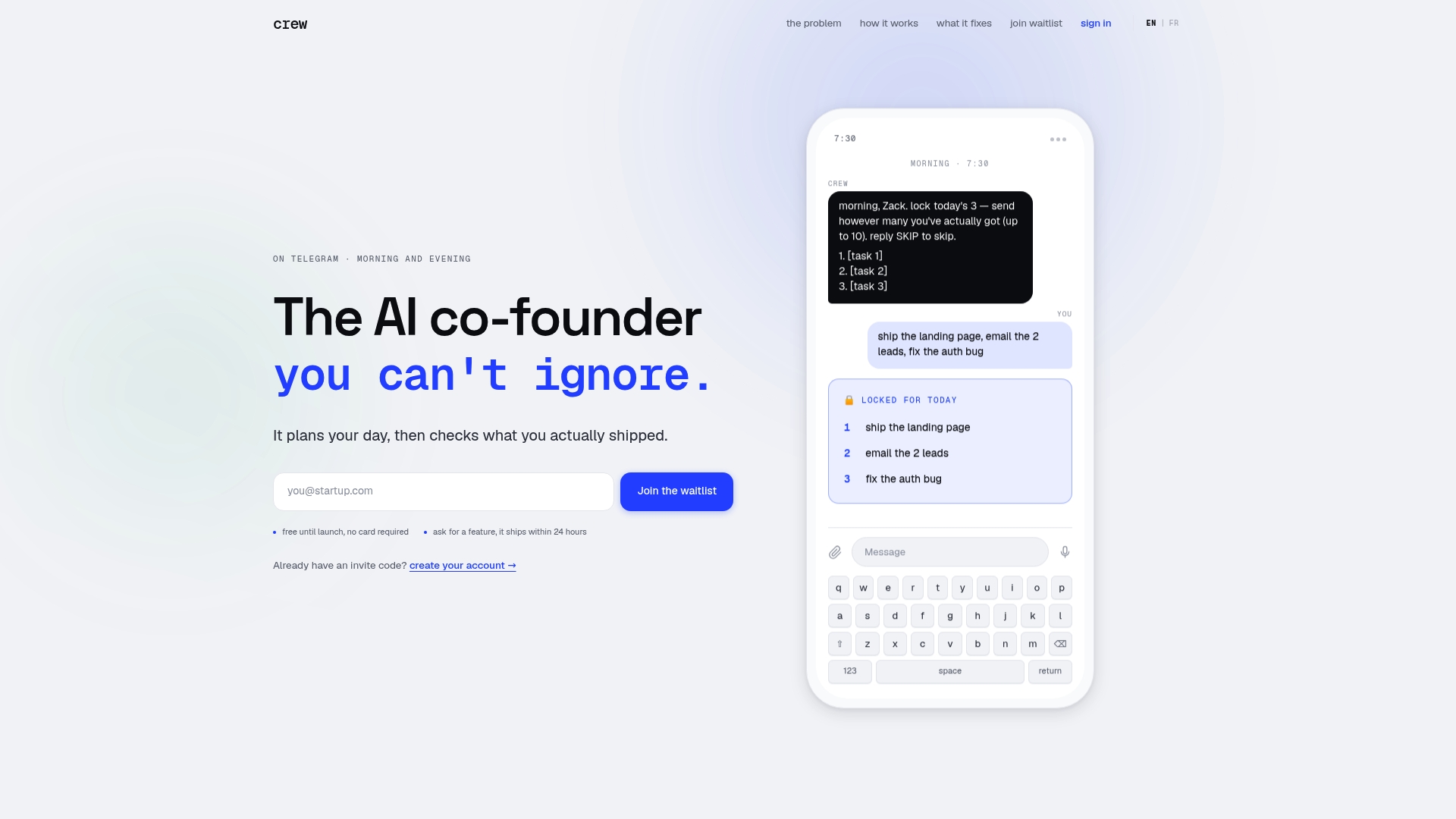
Meetcrew gives you an accountability-first daily planning system with verified completion built in. No per-seat pricing surprises, no multi-day setup, and no reliance on self-reported progress. Connect GitHub, Google Calendar, or Stripe in minutes, lock your first three tasks before noon, and let the end-of-day verification data do the talking.
Your pilot checklist for week one:
- Connect at least one integration (GitHub, Google Calendar, or Stripe) on day one.
- Lock tasks every morning for seven consecutive days and track your completion verification rate.
- At the end of the week, compare what you locked versus what the connectors confirmed as done.
Run the pilot with real work, not demo tasks.
Sources
- The Best Task Management Apps We've Tested for 2026 | PCMag
- Best Task Management Software & Tools
- 5 Top Project Management Tools for Startups