Your Weekly Review Checklist: A 30-Minute Routine
Your Weekly Review Checklist: A 30-Minute Routine

A solid weekly review checklist clears every open loop in your system, surfaces what actually matters next week, and takes between 15 and 60 minutes depending on how deep you want to go. Run it once and you'll understand why David Allen calls it the GTD Weekly Review® the critical maintenance ritual for any trusted productivity system.
Here's the copy-and-use version. Time estimates are in brackets so you can pick your depth:
- Capture loose ends — sweep every inbox (email, notes, physical tray) to zero [5–10 min]
- Scan your calendar — review the past week and look two weeks ahead [3–5 min]
- Review active projects — confirm each has a clear next action [5–10 min]
- Define next actions — write the literal first physical step for anything stalled [5–10 min]
- Check waiting-fors — follow up on anything delegated or pending [2–3 min]
- Set 1–3 priorities — pick the moves that matter most next week [2–5 min]
That's your 15-minute minimal review. Add the project and goals check and you're at 30 minutes. Include a Someday/Maybe sweep and a full goals review and you're at 60.
Pro Tip: Habit-stack the review onto something you already do every Friday — closing your laptop, brewing coffee, or ending a team standup. The sensory anchor is what makes it automatic.
Key Takeaways
A weekly review checklist works best when it ends with three written commitments and one explicit drop — run in 15, 30, or 60 minutes depending on the week.
| Point | Details |
|---|---|
| Pick your depth | 15 min (minimal), 30 min (standard), or 60 min (thorough) — all three end with written priorities. |
| Prepare before you start | Gather inboxes, calendar, and project list before opening your checklist to cut setup friction. |
| End with commitments | Three priorities and one item you're dropping is the non-negotiable output of every review. |
| Restart after missed weeks | Run a 15-minute catch-up review, then return to the full ritual the following week. |
| Meetcrew for follow-through | Convert your top priorities into Meetcrew's daily locked tasks and verify completion via integrations. |
Table of Contents
- Why does a weekly review actually matter?
- What should you gather before starting your review?
- The complete step-by-step weekly review checklist
- How do you adapt this checklist to your own workflow?
- What mistakes kill the weekly review habit?
- A copyable one-hour weekly review agenda
- Which tools and features actually help your weekly review?
- The weekly review changed how I think about Mondays
- Crew turns your weekly review outputs into verified daily work
- Sources
Why does a weekly review actually matter?
Most productivity systems don't fail because the tools are wrong. They fail because nothing forces a regular reckoning with reality. Without a weekly check-in, tasks drift, projects stall without anyone noticing, and Monday arrives with no clear direction. That's what Asian Efficiency calls "system decay" — the slow erosion of trust in your own lists until you stop looking at them.
The benefits of a consistent weekly review are concrete:
- Clarity: You know exactly what's active, what's waiting, and what you've already decided to ignore.
- Fewer surprises: A calendar scan two weeks out catches conflicts before they become crises.
- Better prioritization: Choosing 1–3 priorities during the review means Monday morning isn't a negotiation with yourself.
- Momentum: Small wins compound. Seeing completed projects week over week builds genuine confidence.
The signals that your review is working are just as concrete: you're making fewer reactive decisions during the week, your overdue task count is shrinking, and you can name your top three priorities for next week without hesitation.
A 30-minute weekly review adds roughly 26 hours of strategic reflection per year — more than three full workdays spent thinking about what actually matters, rather than just reacting to what's loudest.
What should you gather before starting your review?
Preparation cuts the actual review time in half. If you spend the first ten minutes hunting for inputs, you'll run out of energy before you reach the important decisions.
Gather these before you open your checklist:
- Email inbox(es) — all accounts you use for work
- Task manager inbox or physical capture tray
- Calendar (past 7 days + next 14 days)
- Active project list
- Waiting-for list (delegated items, pending replies)
- Notes and reference materials from the week (meeting notes, Slack threads, voice memos)
- Habit tracker or streak log, if you use one
When to do it: Friday afternoon is the most popular slot because the week is fresh and you can tie up loose ends before the weekend. Sunday evening works well if you prefer to plan before Monday rather than reflect after Friday. Both are valid; pick the one you'll actually keep.
Where to do it: A consistent physical location matters more than most people expect. Calendar points to environmental cues as one of the strongest predictors of whether a review ritual sticks. A specific chair, a specific playlist, or even a specific mug signals to your brain that it's review time.

Pro Tip: Open one document or template before anything else — your weekly review template, a blank note, or your task manager's review view. One tab, one context. Switching between five apps mid-review is where the hour disappears.
The complete step-by-step weekly review checklist
This is the full script. Each step includes substeps, a decision rule, and a time estimate. Use the time column to run a 15-, 30-, or 60-minute version.
Step 1: Clear your inboxes (5–10 min)
Process every capture point to zero. For each item: do it now (under 2 minutes), defer to a project or next-action list, delegate with a waiting-for entry, or delete it.
- Email inbox(es): archive, reply, or convert to task
- Physical tray or desk: file or trash
- Notes app inbox: process or file
- Voicemails, Slack DMs, text threads: respond or log
Step 2: Review your calendar (3–5 min)
Scan the past week first. Did anything happen that created a new commitment or a follow-up? Then look two weeks ahead. Flag conflicts, prep time you need to block, and any event that requires action before it arrives.
Step 3: Review active projects (5–10 min)
Go through every active project. Each one needs a clear next action. If a project has no next action, write one now. If it's stalled because you're waiting on someone, move it to your waiting-for list.
Decision rule: Does this project still matter? If not, close it or move it to Someday/Maybe.
Step 4: Define next actions (5–10 min)
For anything that surfaced in steps 1–3 without a clear next step, write the literal first physical action. Not "work on proposal" — "open Google Doc and write executive summary intro." Specificity is what makes the list usable on a Tuesday afternoon when you have 20 minutes and no mental energy.
Step 5: Check waiting-fors (2–3 min)
Scan your waiting-for list. Anything overdue for a response? Send a short follow-up now or schedule one. Remove items that have resolved.
Step 6: Sweep Someday/Maybe (2–5 min, standard/thorough only)
Review your Someday/Maybe list. Anything ready to activate? Anything you've lost interest in? Delete freely. This list should feel like possibility, not guilt.
Step 7: Check goals and big outcomes (3–5 min, thorough only)
Look at your quarterly or annual goals. Is this week's work moving any of them forward? If not, is that intentional? One honest look per week prevents the slow drift where urgent work crowds out important work.
Step 8: Set 1–3 priorities for next week (2–5 min)
Pick the moves that matter most. Write them down. Block time on your calendar for them now, before the week fills up.
Pro Tip: End every review with exactly three commitments and one item you're officially dropping. The drop is as important as the commitments — it's the signal that your system is making real decisions, not just accumulating tasks.
The table below shows what each review depth covers:
| Scope | Steps included | Time | Best for |
|---|---|---|---|
| Minimal | Steps 1–2, partial 3, Step 8 | 15 min | Busy weeks, travel, recovery |
| Standard | Steps 1–5, Step 8 | 30 min | Most weeks |
| Thorough | All 8 steps | 60 min | Monthly reset, quarterly planning |
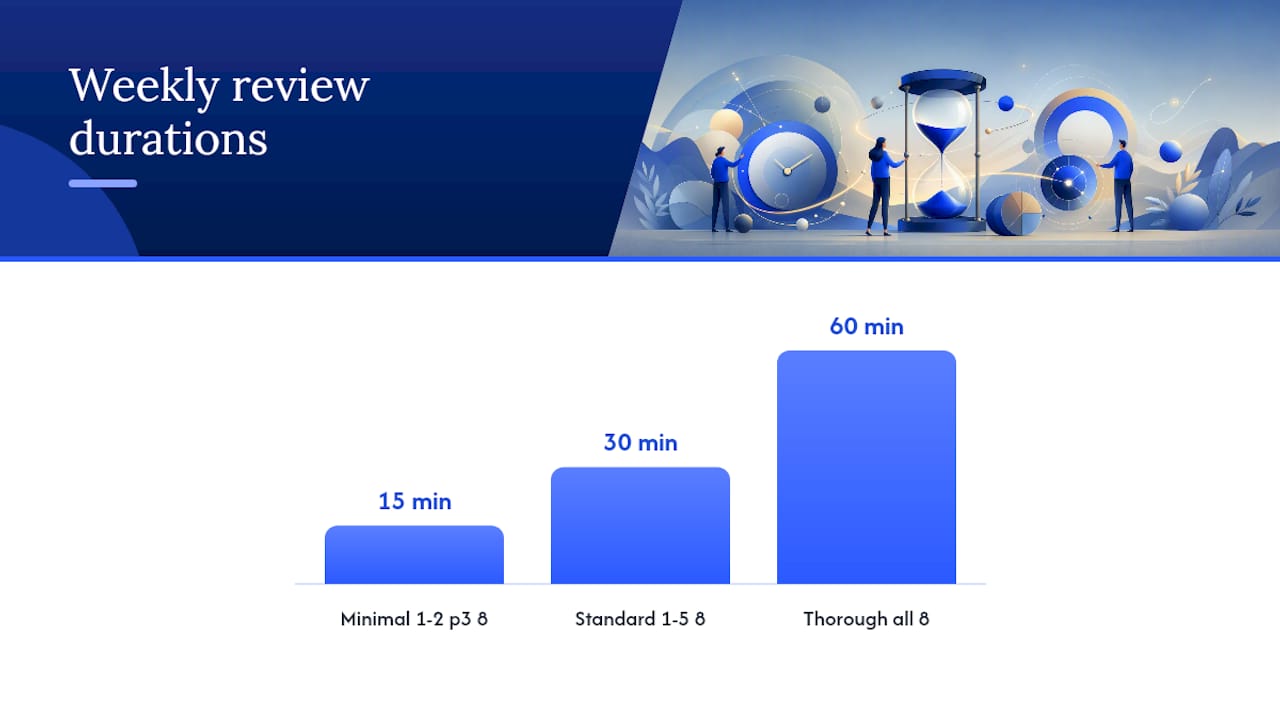
When a block overruns, don't abandon the review — skip to Step 8 and set your priorities. A partial review beats no review every time. Schedule a follow-up deep dive for the steps you skipped.
How do you adapt this checklist to your own workflow?
GTD mapping
The canonical GTD Weekly Review organizes steps under three phases: Get Clear (collect loose papers, process inboxes, empty your head), Get Current (review action lists, calendar, waiting-fors, projects), and Get Creative (review Someday/Maybe, be creative and courageous). The checklist above maps directly onto those phases — Steps 1–2 are Get Clear, Steps 3–5 are Get Current, Steps 6–7 are Get Creative, and Step 8 is the output.
Minimal 15-minute script
Fortelabs' one-touch review framework compresses the ritual into three moves: sweep (clear inboxes), reflect (scan the week), aim (set next week's priorities). For a 15-minute version, that's all you need. Skip Someday/Maybe and the goals check entirely. The only non-negotiable output is your top three priorities.
Custom rule worth adding: If your email inbox has more than 50 unread messages, spend 10 minutes triaging only — flag, delete, or defer — then stop and move to the calendar scan. Don't let inbox zero become the whole review.
Team edition
A team weekly review adds shared priorities to the individual checklist. Before the meeting, each person runs Steps 1–5 solo. The team session then covers:
- What did we ship or complete this week?
- What's blocked or waiting on someone outside the team?
- What are the 1–3 shared priorities for next week?
- Who owns what, and by when?
Keep the team session to 30 minutes. Anything that needs deeper discussion gets a separate meeting, not more review time.
Pro Tip: For founders running solo, the team edition becomes a "board of one" check-in — write your answers to those four questions as if you were reporting to someone. The act of writing for an audience forces honesty that a private list often doesn't.
What mistakes kill the weekly review habit?
The most common failure isn't skipping a week. It's turning the review into something it was never meant to be.
- Planning marathon: The review is not a planning session. Its job is to get current and set direction, not to map out the next quarter. If you're still in your review after 90 minutes, you've drifted into planning. Set a timer.
- Perfectionism: Waiting for the "right" week to do a thorough review means you'll skip it after any rough week — which is exactly when you need it most. A 15-minute catch-up review after a bad week is worth ten skipped thorough ones.
- Journaling drift: Reflection is valuable. Spending 45 minutes writing about your feelings about the week is not a review. Keep reflection to 5 minutes maximum and tie it to a specific question: What worked? What didn't? What's the one thing I'd change?
- Skipping the output: A review that ends without written priorities is just a thinking session. The output — three commitments and one drop — is what makes the time investment pay off during the week.
Pro Tip: When you've missed two or more weeks, run a 15-minute "catch-up" review: clear inboxes, scan the calendar, and set three priorities. Nothing else. Restart the full ritual the following week. Treating a missed week as a catastrophe is what turns a skipped review into an abandoned habit.
A copyable one-hour weekly review agenda
Paste this into a recurring calendar invite. Block the time before you need it.
- 0:00–0:10 — Clear all inboxes to zero. Process email, notes, physical tray. Outcome: nothing unprocessed.
- 0:10–0:15 — Scan last week's calendar. Log any follow-ups or new commitments. Outcome: no missed obligations.
- 0:15–0:25 — Review active projects. Confirm each has a next action. Outcome: every project is current.
- 0:25–0:35 — Define next actions for anything stalled. Write the literal first step. Outcome: no project without a move.
- 0:35–0:40 — Check waiting-fors. Send follow-ups. Outcome: waiting-for list is current.
- 0:40–0:45 — Sweep Someday/Maybe. Activate or delete. Outcome: list feels like possibility.
- 0:45–0:50 — Check goals. Is this week's work connected to what matters most? Outcome: honest yes or no.
- 0:50–1:00 — Set 1–3 priorities. Block calendar time for them. Write one item you're dropping. Outcome: next week has a direction.
If any block overruns, compress the next one — but never skip Step 8. Priorities and calendar blocks are the deliverables the whole hour is building toward.
A 30-minute review done consistently compounds into more than 26 hours of focused strategic thinking per year. The one-hour version doubles that. The math makes a strong case for protecting the time.
Which tools and features actually help your weekly review?
The tool matters less than the template. A consistent structure you return to every week beats a sophisticated app you use inconsistently. That said, certain features genuinely reduce friction:
- Single inbox view: One place where all tasks land, regardless of source
- Calendar integration: Seeing tasks and events in the same view prevents the calendar-vs-task-list split that causes things to fall through
- Reusable templates: A review template you open every week, already structured, removes the "where do I start?" friction
- Easy archiving: The ability to log a one-line weekly summary (week, rating, first move) and move on — without building a filing system around it
- Exportable review history: Being able to look back at three months of weekly summaries reveals patterns that a single week never shows
On automation: AI tools can gather and summarize inputs — pulling calendar events, flagging overdue tasks, summarizing email threads. Ripple's 2026 template guide makes the right call here: automation handles data gathering, but the human retains the decision step. What gets prioritized, what gets dropped, what gets delegated — those are judgment calls that no automation should make for you.
The most useful automation is the kind that removes the setup cost of the review, not the thinking cost. If a tool can pre-populate your review template with last week's calendar and open tasks before you sit down, that's 10 minutes saved without any loss of judgment.
After the review, the highest-leverage move is turning your top 1–3 priorities into verified daily commitments. Self-reported progress is notoriously unreliable — which is why connecting review outputs to a system that actually checks whether work happened matters more than most productivity writers admit.
Pro Tip: Keep a one-line archive entry for each week: date, a 1–5 rating, and your single most important move for next week. After 12 weeks, patterns emerge that no single review would surface — recurring stalls, energy dips, and the projects that keep getting deferred.
The weekly review changed how I think about Mondays
The standard productivity advice frames the weekly review as a planning tool. That's true, but it undersells what actually changes. Before a consistent review habit, Monday morning is a negotiation — with your inbox, your calendar, and your own memory of what you were supposed to be doing. After six weeks of consistent reviews, Monday becomes a confirmation. You already know what matters. You blocked the time. The week has a shape before it starts.
What surprised me most was how much the output mattered more than the process. A 15-minute review that ends with three written commitments and one explicit drop outperforms a 90-minute session that ends with a vague sense of having thought about things. The discipline of naming what you're not doing is where most of the value lives.
For founders especially, the review doubles as a forcing function for honesty. Solo builders who stop shipping often don't notice the drift until weeks have passed. A weekly review surfaces that drift after seven days, not seven weeks.
Crew turns your weekly review outputs into verified daily work
After the review, the gap most people fall into is between "I set three priorities" and "I actually worked on them." Meetcrew closes that gap. Each morning, you lock in 3–10 prioritized tasks — the direct output of your weekly review — and Crew verifies completion through integrations with GitHub, Google Calendar, Stripe, Vercel, and Gmail. No self-reporting. No guessing. Actual proof that the work happened.

The workflow is straightforward: finish your review, open Meetcrew, and convert your top priorities into that day's locked commitments. The browser extension makes it low-friction, and the streak system keeps the habit visible. For founders and small teams who want accountability that doesn't rely on willpower, Meetcrew is the layer between a good weekly plan and consistent daily execution. Crew is invite-only while it is in early access, and free during that period.
Sources
The canonical starting point for any weekly review is the GTD Weekly Review® PDF from David Allen's Getting Things Done. It's the template that most modern guides adapt, and it's free to download directly from the GTD website.
For modern adaptations:
- The One-Touch Guide to Doing a Weekly Review
- GTD Weekly Review: 6-Step Checklist & Template
- How to Build a Weekly Review Habit That Actually Sticks - Calendar
- The Ultimate Weekly Review Template (2026 Edition) | Ripple
For mapping review outputs into daily verified tasks, Meetcrew's landing page and the Crew browser extension are the relevant next steps.